Staying Connected Abroad: eSIM, Roaming and Wi-Fi for Travelers
Roaming, local SIM, travel eSIM or Wi-Fi only? Compare the options and get your phone ready before you fly.

An eSIM for travel lets you land, switch on your phone and have local data within minutes, without hunting for a SIM shop. But it is not the right answer for every trip, so this guide compares eSIMs with roaming, local SIM cards and Wi-Fi only, then gives you a checklist to get your phone ready before you fly.
Key takeaways
- Check two things first: is your phone unlocked, and does it support eSIM? Without both, a travel eSIM will not work.
- Roaming is simplest and can be cheap in some regions, such as within the EU, but can be very expensive elsewhere.
- A travel eSIM is usually best for short and medium trips; a local SIM can win on long stays and heavy data use.
- Install and test any eSIM before you leave home, while you still have reliable internet.
- Keep offline copies of boarding passes, maps and bookings in case data fails at the worst moment.
What an eSIM is, in plain terms
A SIM is what identifies your phone to a mobile network. An eSIM does the same job, but the SIM is built into the phone and the network profile is downloaded instead of inserted on a plastic card. The GSMA, the global mobile industry body, describes eSIM as a specification for remote SIM provisioning that lets a device store more than one operator profile and switch between them.
For travelers, that means you can buy a data plan for your destination online, scan a QR code or tap an in-app link, and keep your home number on the same phone. Most travel eSIMs are data only: you get mobile internet, but not a local phone number for calls and texts.
Your phone must be unlocked to use another provider’s SIM or eSIM. The US Federal Communications Commission notes that locks can apply to eSIMs as well as physical SIM cards, and that even a phone bought at full price may be locked for a short period. Ask your provider before you travel; unlocking can take a few days.
Roaming vs local SIM vs travel eSIM vs Wi-Fi only
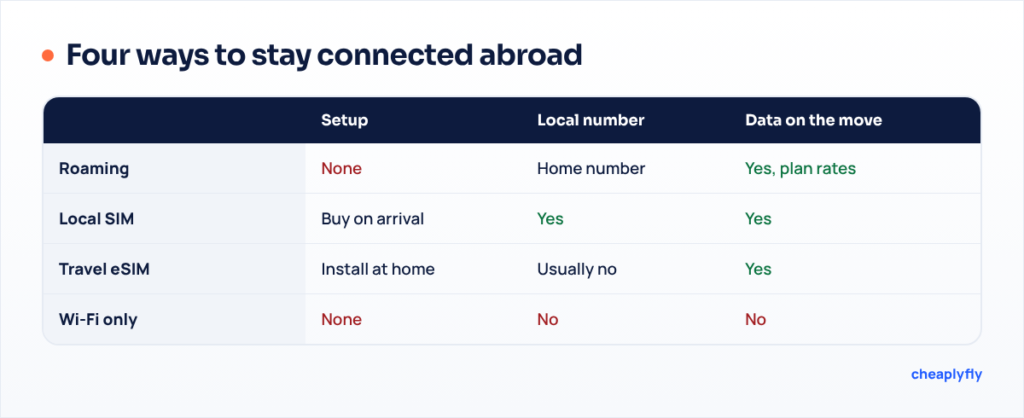
There are four main ways to stay connected abroad. Each suits a different kind of trip, and the cheapest option depends on your home plan, your destination and how much data you use.
| Option | How it works | Best for | Watch out for |
|---|---|---|---|
| Roaming on your home plan | Your phone uses a partner network abroad and your home provider bills you | Short trips, travelers who need their usual number, regions where roaming is included | Daily or per-MB charges outside your plan; check before you go |
| Local physical SIM | Buy a SIM in the destination from a local provider | Long stays, heavy data use, needing a local number | Shop hours, ID registration in some countries, swapping cards, needs an unlocked phone |
| Travel eSIM | Download a data plan for one country or region before you fly | Most short and medium trips, multi-country trips | Usually data only, needs an eSIM-capable unlocked phone, some plans throttle speed after a limit |
| Wi-Fi only | Keep mobile data off and connect at hotels, cafes and airports | Very light users, cost-conscious travelers | No connection on the move, security on open networks, no maps or ride apps when you need them |
When roaming is the easy answer
Check what your plan already includes. In the European Union, “roam like at home” rules mean that a SIM from an EU country can generally be used in other EU countries, plus Iceland, Liechtenstein and Norway, at domestic prices, subject to fair use limits. The EU has extended these rules until 2032. Outside rules like these, roaming prices are set by each provider and can be high, especially for data.
Some providers sell daily or weekly roaming passes. Compare the total cost for your trip length against a travel eSIM plan with the same data allowance.
When a local SIM wins
If you are staying a month or more, need a local number for bookings or deliveries, or use a lot of data, a local SIM or local eSIM from a destination provider may give better value. Some countries require ID registration for SIM purchases, so carry your passport when you buy one.
When an eSIM for travel is the smart choice
For most trips of a few days to a few weeks, a travel eSIM is the most convenient option. You can buy it before departure, it works as soon as you land, and you keep your home SIM in the phone for calls and verification texts. Regional plans that cover several countries are handy for multi-stop trips.
How to set up an eSIM for travel
Setting up takes about ten minutes. Do it at home a day or two before departure, not at the arrival gate.
-
Confirm compatibility
Check your phone’s settings for an option to add an eSIM, or look up your model on the manufacturer’s website. Confirm the phone is unlocked with your provider.
-
Choose a plan by data, days and coverage
Estimate your daily data needs. Maps, messaging and email use relatively little; video calls and streaming use much more. Check that the plan covers every country on your trip.
-
Buy from a seller you can verify
Use a well-known provider and read the refund policy. Our guide to spotting fake booking sites covers the same warning signs that apply to eSIM sellers.
-
Install while on reliable Wi-Fi
Scan the QR code or follow the in-app setup. Installing usually needs an internet connection, so do it before you leave. Label the new line clearly, for example “Travel data”.
-
Set the data line, keep the home line
In your phone’s settings, set the travel eSIM for mobile data and turn data roaming on for that line only. Turn data roaming off on your home line to avoid surprise charges.
-
Activate on arrival
Some plans start their validity when they first connect abroad. Switch the line on after landing and check that data works before leaving the airport.
Do not delete an eSIM profile until you are sure you are finished with it. A deleted eSIM often cannot be reinstalled from the same QR code, so check with the provider first.
Phone-readiness checklist before you fly
A working connection is only half the job. Prepare your phone so that a dead network, a flat battery or a lost signal at the gate does not derail the trip.
Before departure
- Phone unlocked, eSIM compatibility confirmed, travel eSIM installed and labeled.
- Boarding passes saved offline: in your phone’s wallet app, as a screenshot and as a PDF. Our guide to online check-in and boarding passes explains when to download them.
- Offline maps downloaded for your arrival city and the route from the airport.
- Booking confirmations, hotel address and insurance details saved offline.
- Two-factor authentication: home SIM kept active for bank codes, or an authenticator app set up.
- Banking and payment apps updated and tested; cards set for travel if your bank requires it.
- Charger, cable, plug adapter and a power bank in your carry-on.
- Emergency numbers for your destination and your embassy or consulate saved as contacts.
If this is your first trip by air, the first-time flyer guide walks through the whole day, from packing to landing, including when to have your phone ready.
Using your phone on the plane and on public Wi-Fi
On board, follow crew instructions. The US Federal Aviation Administration says phones and other portable devices must be used in airplane mode or with the cellular connection disabled, and that you can use Wi-Fi if the aircraft has it installed and the airline allows it. Rules elsewhere follow similar lines, but the airline sets the details.
In-flight connections can be expensive. If your phone connects to a network on a ship or plane, that service may sit outside normal roaming price caps; the EU notes that satellite-based services on planes and ships are not covered by its roaming rules. Keeping airplane mode on solves this.
Public Wi-Fi in airports, hotels and cafes is useful but needs care. The FTC advises checking that sites use encryption (“https”) on every page and logging out when you finish. A sensible habit: use mobile data, not open Wi-Fi, for banking and for paying for anything, including flights. Our guide to paying for flights and choosing a currency covers safe payment abroad in more detail.
Worked example: picking a setup for one trip
Illustrative example
A traveler is going on a 10-day trip to two neighboring countries outside their home region. Their home plan charges a daily roaming fee. They mainly need maps, messaging and occasional video calls.
Roaming would mean paying the daily fee for 10 days. A local SIM would need a new card in each country. A regional travel eSIM covering both countries, with a data allowance that fits their use, gives one setup for the whole trip. They install it at home, keep their home SIM for bank codes with data roaming switched off, and save boarding passes and maps offline as a backup.
On a three-month stay in one country, the same traveler might choose a local SIM instead, because it is more likely to offer a large data allowance and a local number.
Frequently asked questions
Can I keep my normal number while using a travel eSIM?
Yes, on phones that support more than one line. Keep your home SIM active for calls and texts, and set the travel eSIM as the line for mobile data. Turn off data roaming on your home line to avoid charges.
Do travel eSIMs include phone calls?
Many are data only. You can still call and message over the internet using apps. If you need a local number, choose a plan that includes one or buy a local SIM.
When should I install my travel eSIM?
Install it a day or two before departure while you have reliable Wi-Fi, then switch it on after landing. Check whether the plan’s validity starts at installation or first use.
How do I know if my phone supports eSIM?
Look in your phone’s mobile or cellular settings for an option to add an eSIM, or check the model on the manufacturer’s website. The phone must also be unlocked.
Is roaming in Europe free?
For SIMs from EU countries traveling within the EU, Iceland, Liechtenstein and Norway, roaming is generally charged at domestic rates, with fair use limits. For SIMs from elsewhere, your home provider’s roaming prices apply.
What if my data stops working at the airport?
Use your offline boarding pass and maps, then connect to the airport Wi-Fi to troubleshoot. Check that the travel line is selected for data and that data roaming is on for that line.
Sources
- GSMA: What is eSIM for consumer and IoT?
- Federal Communications Commission: Cell phone unlocking
- Your Europe: Roaming, what you pay to use your smartphone in another EU country
- European Commission: Roaming questions and answers
- Federal Aviation Administration: Flying safe
- FTC Consumer Advice: Are public Wi-Fi networks safe?